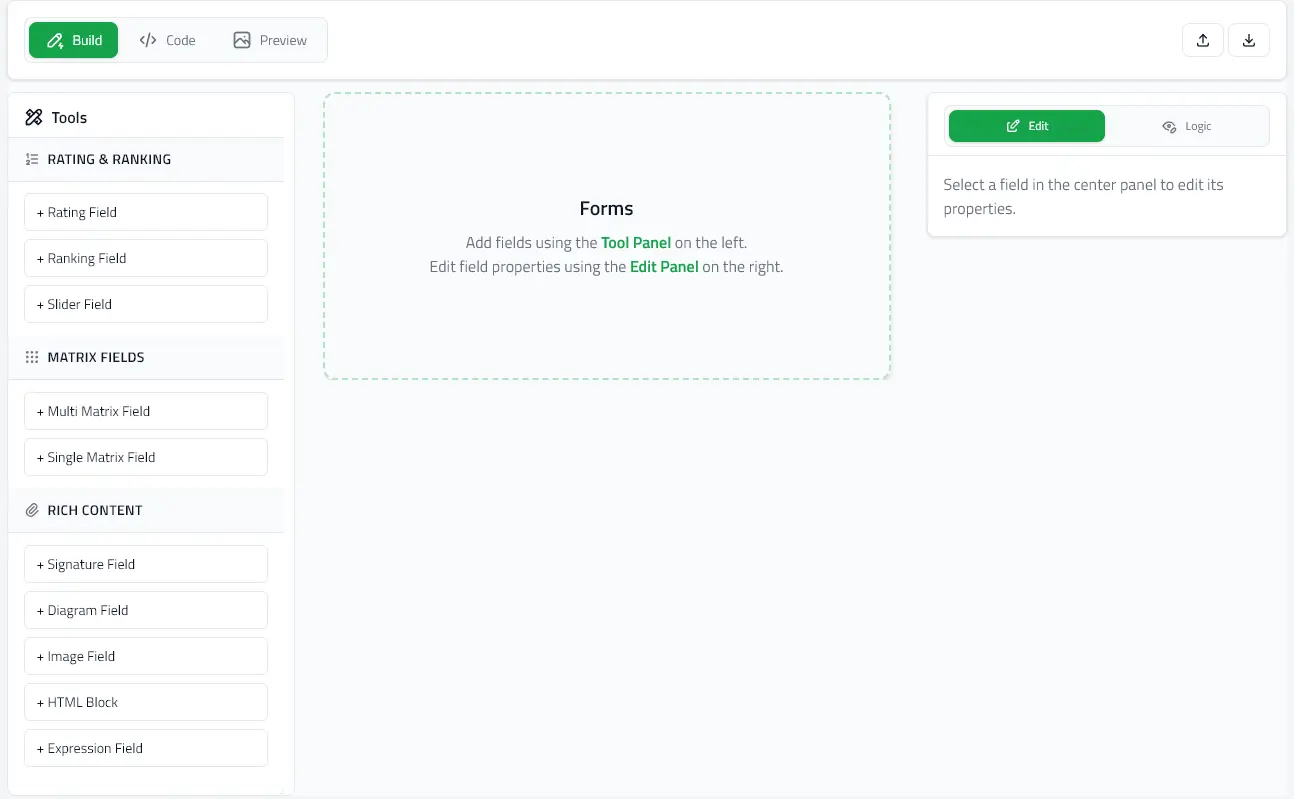
Editor Overview

The @mieweb/forms-editor package provides a full-featured questionnaire editor with visual building tools, code editing, and live preview.

What is the Editor?

The editor is a React component that allows users to visually create and modify questionnaires. It provides three editing modes:

  • Build Mode - Visual field editor with click-to-edit interface
  • Code Mode - Monaco-powered JSON editor with syntax highlighting
  • Preview Mode - Live testing as end-users will see the form
  • Field Properties Panel - Configure field settings, options, and validation
  • Section Management - Organize fields into logical groups
  • Import/Export - Load existing forms and download as JSON

Live Demo

Try out the full-featured editor with a visual interface:

Interactive Editor Demo

Build and customize questionnaires with visual tools and live preview.

Launch Editor Demo →

Key Features

Dual Editing Modes

  • Visual Editor - Click-to-edit interface for field properties
  • Code Editor - Monaco-powered JSON/YAML editor with syntax highlighting

Live Preview Toggle

Switch between edit and preview modes instantly to test:

  • Field appearance and behavior
  • Conditional logic (enableWhen)
  • Required field validation
  • User experience flow

Import/Export

  • JSON - Standard format for forms
  • YAML - Human-friendly alternative
  • SurveyJS - Import existing SurveyJS schemas

Field Library

Pre-built field components for all types:

  • Text inputs (single/multi-line)
  • Selection fields (radio, check, dropdown)
  • Rating scales and sliders
  • Advanced fields (expressions, diagrams, HTML content)

Three Editing Modes

Build Mode (Visual Editor)

The default mode with full visual editing:

  • Drag-and-drop field reordering
  • Click to select and edit fields
  • Add fields from the tool panel
  • Configure properties in the right panel
  • Set up conditional logic (enableWhen)
  • Organize fields into sections

Code Mode (JSON Editor)

Direct schema editing with Monaco:

  • Syntax highlighting and validation
  • Auto-formatting and pretty-print
  • Bulk editing capabilities
  • Full schema access
  • Copy/paste field definitions

Preview Mode

Test your form as end users will see it:

  • Fill out the form with sample data
  • Test conditional field visibility (enableWhen)
  • Verify required field validation
  • Check responsive layout
  • Experience the user flow

See Editor Modes for detailed documentation.

Integration

The editor is a standard React component:

import { QuestionnaireEditor } from '@mieweb/forms-editor';

<QuestionnaireEditor
initialFormData={formSchema}
onChange={(updatedSchema) => saveForm(updatedSchema)}
startInPreview={false}
/>

Requirements: React 18+ and React DOM 18+

Use Cases

  • Form Management Systems - Admin panels for creating questionnaires
  • Healthcare Platforms - Patient intake form builders
  • Survey Tools - Custom survey creation interfaces
  • Data Collection - Build forms for research or registration
  • No-Code Platforms - Visual form builders for non-technical users

Next Steps